NBS: VM disks that survive a dead server
nos now keeps a VM's disk on three hosts at once. How NBS cuts a volume into chunks, what Raft keeps and what it doesn't, what happens when a host dies, and how to use it from the panel and the shell.
Until this month a VM's disk in nos was a file on the host the VM ran on, or a partition of that host's NVMe drive. That is simple and fast, and when the host dies the VM goes with it. You can start it again only after the host comes back, and only if its disk survived.
NBS is what we built to fix that. It is replicated block storage: a VM's disk is a volume, the volume is cut into 4 MiB chunks, and every chunk is kept on three hosts. When one of them goes down, the VM keeps running on the other two copies. When the VM's own host goes down, you start the VM on another host and its disk is already there.
The task, as it was written down on 5 November, was network block storage for nos, for VMs' disks, images and snapshots, with three replicas, Raft, and every service a kernel module. It is written from scratch in Rust, on top of things nos already had: encrypted links between hosts, a cluster registry and a Raft library.
Three servers to start with
Three replicas need three hosts, and a Raft majority needs three voters. We had two servers: the Hetzner EX44 that nos runs on, and an AX41 that runs Ubuntu. So the third host is a bit of a cheat. The AX41 runs two nos VMs under KVM, and each of them is a host of the cluster, as is the EX44 itself. All the numbers below were measured on that setup, over the EX44's 1 Gbit/s link.
What runs on each host
Each host loads four modules. ipcnet.ko connects the hosts to each other: every pair has two TCP connections, both under TLS 1.3, and each side knows the other's key in advance. cluster.ko keeps the cluster's registry, the list of hosts with their keys and addresses, and a host has to be in it before NBS will talk to it. NBS itself has no port of its own. Its two services are names in nos's message channel, nbs.mds and nbs.cs.
nbs-mds.ko is the metadata service. Every host keeps the whole state, in memory and on its own disk, and Raft keeps the copies the same. nbs-cs.ko is the chunk server. It owns the devices a host gives to NBS, a partition or a whole drive, and stores chunks on them in a format of its own.
The client is not a service at all. It is a library inside the hypervisor module, so when a guest reads or writes its disk, the request goes from hv straight to the chunk servers that hold the data:
write   client on A --> cs on A --> cs on B --> cs on C
read    client on A --> cs on A
meta    mds on A <== Raft ==> mds on B <== Raft ==> mds on C
The metadata service is asked where the chunks are when a volume is attached and when something changes, never for each request. This was one of the first decisions, and it pays off later: whatever happens to the metadata service, a disk that is already attached keeps working.
Volumes, chunks and replica sets
A volume has a name, a size of up to 16 TiB, a host of its own (usually where its VM runs) and a map with one entry per 4 MiB chunk. Chunks are grouped into replica sets. A set is three chunk servers on three different hosts, and all the chunks placed on the same three hosts share it. When a host is lost, only the handful of sets it belongs to change, not every chunk it held.
Chunks are placed when the volume is created, inside Raft's apply step and from committed state alone, so every host arrives at the same answer without asking anyone. One replica goes to the volume's own host, so that reads stay local. The other two go to the hosts with the most free space. The whole size is reserved up front, and a chunk that was never written reads as zeros and takes no space on disk. With four or more hosts NBS also keeps enough room aside to rebuild the biggest host, and refuses a volume that would eat into it.
What Raft stores is small: the members, the hosts and their devices, the volumes, the sets and the chunks. A chunk costs 12 bytes of memory, plus 4 for each map that points at it, which comes to about 4 MiB of heap per TiB of volumes. Things that change all the time are kept out of Raft on purpose. Whether a host is alive, how full a device is and how much I/O is going on are never written to the log.
How a write gets to three disks
A volume has one writer at a time: the host whose VM has it attached. Attaching gives the writer a new generation number, and every chunk server fences the volume at that generation before answering. A VM started again on another host gets a newer generation, so the old host's late writes are refused, even if it comes back with requests still in flight.
A write is done when every replica in its set has it. The first version sent each write from the writer's host to all three replicas. On a 1 Gbit/s link that means two copies leave the host for every byte written, and writes topped out around 55 MiB/s. Now a write travels along a chain instead. The data leaves the writer once, to the local replica, which passes it to the second one, which passes it to the third, and each replica answers the writer by itself. A hop that hasn't answered 0.25 s after the replica before it is sent the data directly. Writes at depth went from 56 MiB/s to 84-91 MiB/s, close to what the link can carry.
The chain made single writes slower, though. At queue depth 1 each hop has to receive the whole piece before passing it on, and a 256 KiB write dropped from 25 MiB/s to 11-15. So a write that is the only one in flight now goes to all three replicas directly, and the chain is used only when there is more than one write out, which is the case it was built for. With that, a 4 KiB write at depth 1 went from 0.73 ms to 0.51 ms, and 256 KiB writes from 25 MiB/s to 47.
A read goes to one replica, the local one where there is one, and to another one if it doesn't answer. Data is durable when the guest flushes, the same as with a real disk: a flush is answered once every replica has made the writes before it durable.
When something breaks
This is the part that took most of the time.
When a replica doesn't answer a write within 0.5 s, the writer reports it to the metadata leader. The leader doesn't take the writer's word for it. It pings the chunk server itself, with a 250 ms timeout, and takes it out of the set only if it gets no answer either. After that the writes go on to the two remaining replicas. The second opinion is there because a writer with a broken network of its own would otherwise strip healthy servers out of sets that other volumes share. The last active replica of a set is never taken out. Writes wait for it instead.
The leader also watches every chunk server on its own. One that has been silent for 5 s is marked down. After 10 minutes down (the out_after parameter) it is declared out, and its places in the sets go to other hosts, which copy the data over. With exactly three hosts there is nowhere to copy to, so the volume runs on two replicas until the host is back. It takes a fourth host for NBS to get back to three copies on its own.
A host that comes back doesn't copy everything. It compares checksums of its chunks against a healthy replica and pulls only what changed while it was away. In one test we killed a host while 4 KiB writes were running at depth 8. The longest write took 779 ms: the writer's 0.5 s, the leader's ping and a Raft commit. Then the writes went on to two replicas. When the host booted again it pulled the 16 chunks written meanwhile, checked the other 2,032 by checksum, and was a full member again 86 s after its boot started. In another test a host was lost for good, with a fourth host standing by. It was marked down after 16 s and out after 10 min 13 s, the fourth host copied its 8 GiB in 184 s, and 13 min 21 s after the kill every chunk was at three replicas again.
If the metadata leader dies, Raft elects another one and nothing else notices, since the data path doesn't go through the metadata service. If there is no majority at all, nothing can be changed or repaired, but volumes that are already attached keep working. In a network split the minority commits nothing. A writer on the minority side carries on as long as it can reach all its replicas and doesn't need anything changed, and waits otherwise. Where we had to choose, we chose safety over availability.
Power cuts are the chunk server's business. Every record on its device is written twice, copy A, a flush, then copy B. Fences, and the marks that say a chunk is open for writing, are made durable before the chunk server answers. If the writer died in the middle of a write, its next attach reconciles the chunks that were open, copying from one replica to the others until all three agree. And if a VM's host is gone for good, hv start <name> force takes its volumes over on another host, with a new generation that fences the old host out.
Two things are left to a person on purpose. The first is bit rot. A scrub reads each chunk's replicas in 64 KiB pieces, compares CRC32C checksums, looks twice two seconds apart so that a write in progress isn't mistaken for damage, and reports a replica that differs from the other two. In the first design the scrub took the odd replica down by itself. The fuzzer showed why that is a bad idea: a joining host had copied from a source that had already rotted, two replicas then agreed on the bad data, and the scrub took down the only good copy. A chunk server keeps no checksums of its own data, so two matching copies prove nothing. Now the scrub only reports, and nbs replica bad <set> <host> takes a replica down once someone has looked. The second is a forked state. Every 64 Raft entries each member compares the SHA-256 of its state with the leader's, and a member that differs stops instead of serving wrong metadata.
Snapshots, images and clones
A snapshot of an attached volume is taken on the writer's host: the writer pauses, closes every chunk it has written and answers. The snapshot takes no space at first. An image is a volume frozen for good, read-only. New volumes are cloned from images or snapshots, again without copying anything, so a VM made from a 3 GiB image costs only metadata until it starts writing. The first write to a chunk the clone still shares with its image copies that chunk on each replica's own device, and the write goes to the copy.
How we tested it
Most of NBS has no kernel in it. The metadata state machine, the chunk server's engine, the wire format and the client are ordinary Rust crates, and the same code runs in the kernel and in a fuzzer on a laptop. The fuzzer's cluster target runs six hosts' chunk servers and metadata members over a simulated network, crashes hosts, hands leadership around, and checks that everything written reads back. Other targets cut the power under a chunk server in the middle of its writes, with requests in flight, and while a joining host is copying. On top of that there are 275 mutants. Each one removes a single rule from the code, a check or a fence or a timeout, and the fuzzer has to notice. All but three are caught, and those three are written down as known gaps.
The fuzzer didn't find everything. Two problems showed up only on the real servers. The first was a busy VM stopping. A stop closes every chunk the VM wrote, and a close means two record writes and two flushes. On a VM's 10 ms flush, 140 closes were seconds of queue at the chunk server. The leader's 250 ms ping waited behind that queue, healthy replicas were taken out, and 2.6 GB were copied again for nothing. The chunk server now answers pings ahead of its queue, and later it was rewritten to keep up to 64 requests in flight and write its records in batches. 1,024 closes now take less than a second.
The second was the client sending too much at once. A guest keeps up to 64 requests of 248 KiB in flight, which is more than the link between two hosts will queue, so the rest bounced and went out again 200 ms later, and bounced again. On the demo stand that meant writes taking 1.5 s at 10 MiB/s. The client now keeps at most 2 MiB in flight per volume. Bounces went from 1,036 in 15 seconds to none, and the slowest writes from 1.4 s to 0.25 s.
For the whole thing working together, nbs-test.py boots three nos under QEMU and runs 245 checks against the real modules, and hv-nbs-test.py runs Linux guests on volumes, including a snapshot of a running VM and a second VM booted from it.
Numbers
Measured between the EX44 and the two VMs on the AX41 over 1 Gbit/s, on an 8 GiB volume, except the depth-1 writes, which were measured on three VMs on the AX41:
| What | Result |
|---|---|
| Reads, 4 KiB, depth 8 and up | 47-50k IOPS |
| Reads, 256 KiB, depth 8 | 1.5-1.6 GiB/s |
| Writes, 256 KiB, depth 8-16 | 84-91 MiB/s |
| Writes, 4 KiB, depth 1 | about 2,000 IOPS (0.51 ms) |
| Writes, 256 KiB, depth 1 | 47-48 MiB/s |
| First write to a fresh chunk, p99 | 1.3-5.6 ms |
Reads come from the local replica, so they run at close to the device's speed. Writes are bound by the network. These numbers were taken while the links between hosts still encrypted in portable Rust. Since 16 November they run ChaCha20-Poly1305 on CRYPTOGAMS assembly, which on the one machine we have measured it on seals 3.7 times as fast as the portable code. NBS hasn't been measured again since.
Using it from the panel
Each host's page in the management panel has a Block storage section. On a new cluster it offers Make an NBS cluster. After that you add the other hosts with Add a host, once the cluster's registry knows them (the Cluster section does that with Make a cluster, Invite a host and Join a cluster), and each host gets its storage with Add a device, a partition or a whole disk picked by its id. From then on the page shows what to look at first (a chunk server down, chunks at two replicas, no leader), then the volumes with their health in green, yellow, orange or red, the chunk servers, the members and the devices. Each volume has Grow, Snapshot, Clone, Make an image and Delete. Delete and Make an image ask you to type the name again.
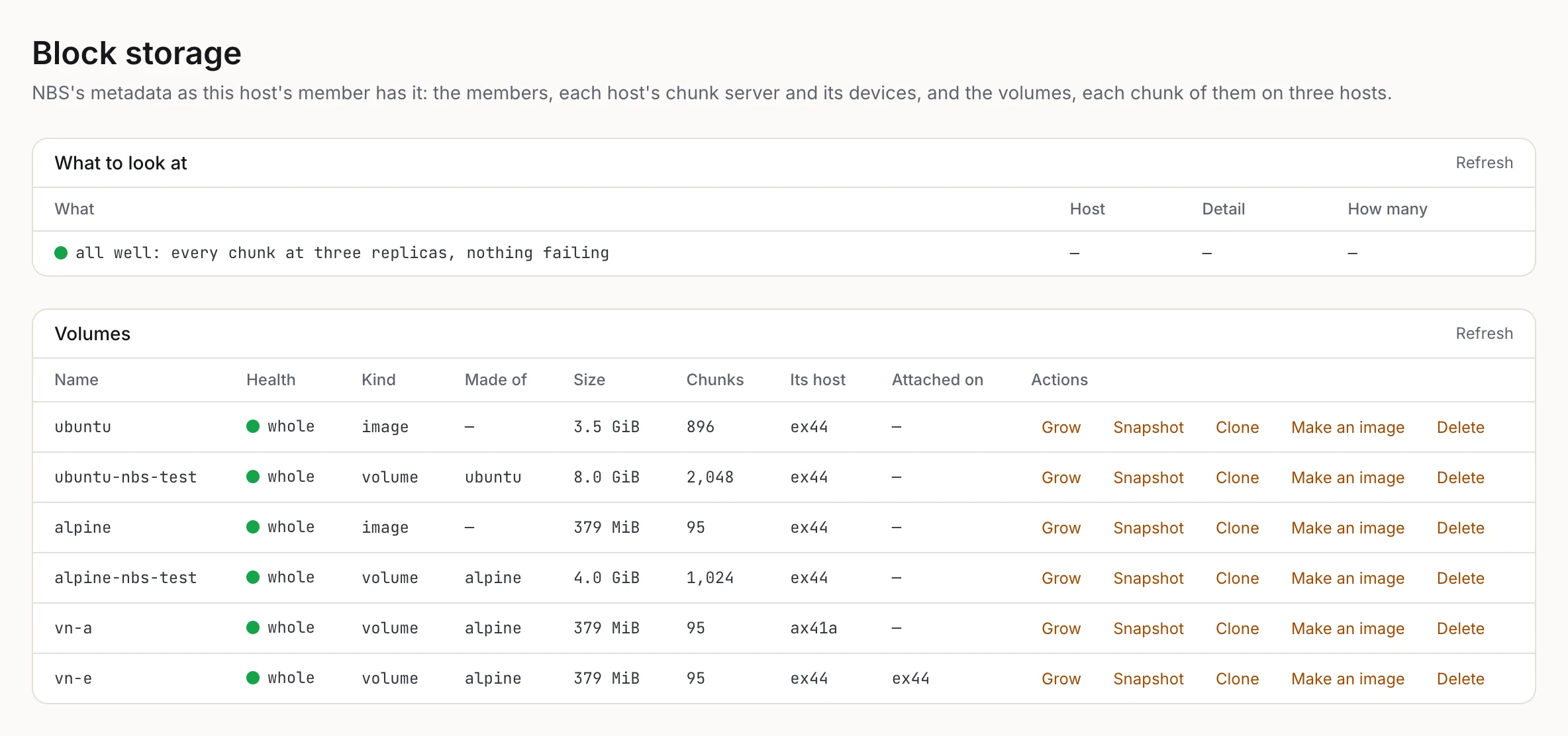
The EX44's Block storage page. Every chunk is at three replicas. ubuntu and alpine are images, and the four volumes are clones of them; vn-e is attached on the EX44, where its VM runs.
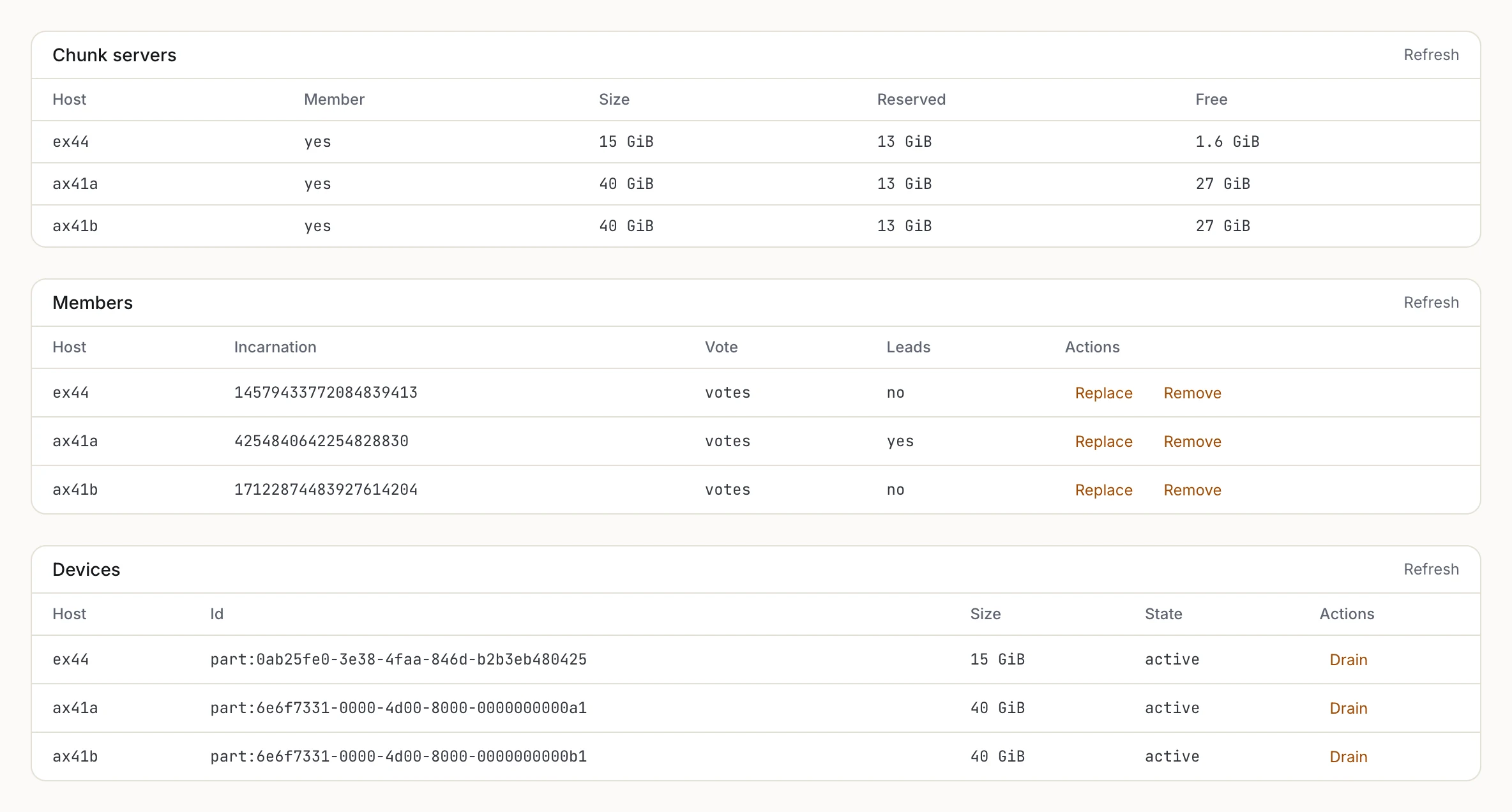
Further down: a chunk server on each host, the EX44's on a 15 GiB partition and the two VMs' on 40 GiB each, the three members with ax41a leading, and the devices by their partition ids.
The Images page lists NBS images and snapshots. New image takes a URL, with the Debian 13 and Ubuntu 24.04 cloud images one click away, downloads it on the host, writes it onto a new volume and freezes it.
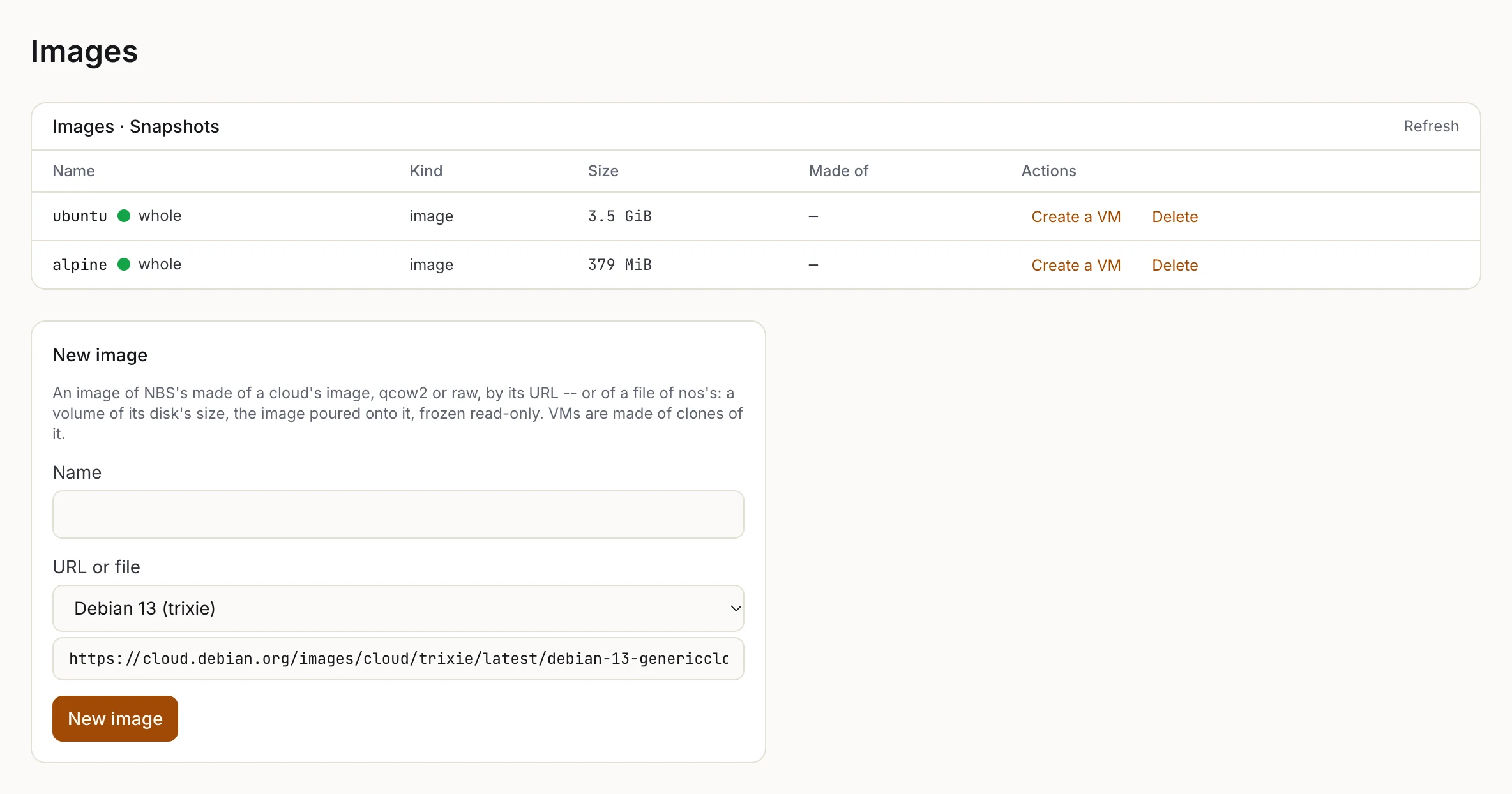
The Images page: two images, and the form that makes a new one from a cloud image's URL.
Create a VM on an image's row, or "An image of NBS's" as the source in the VM form, makes a VM whose disk is a thin clone of that image.
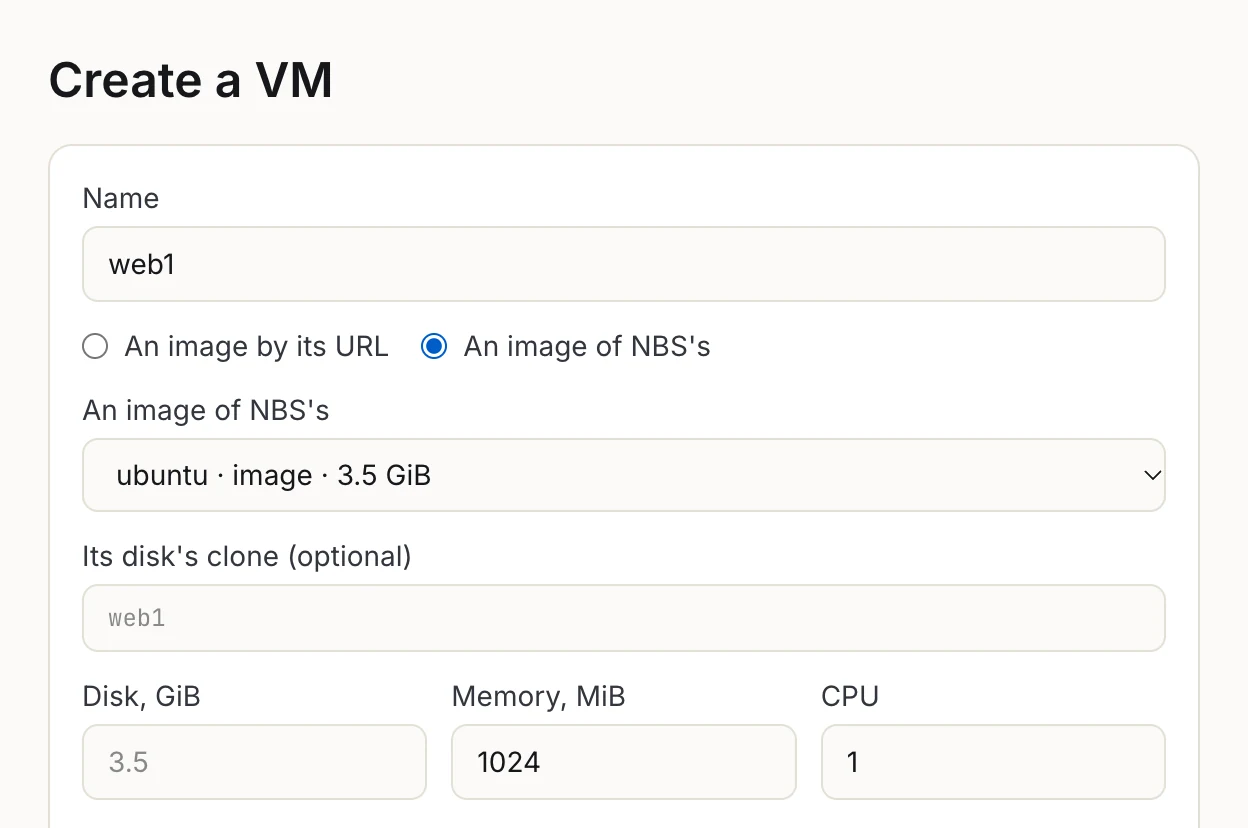
The VM form with an NBS image as the source. The clone is named after the VM unless you give it a name of its own.
A VM's own page has a Snapshot action and lists the VM's snapshots, each with its own Create a VM, and its Disks tab charts each disk's IOPS and bandwidth, turns a disk yellow when its latency climbs and red on errors, and shows the volume's health next to it.
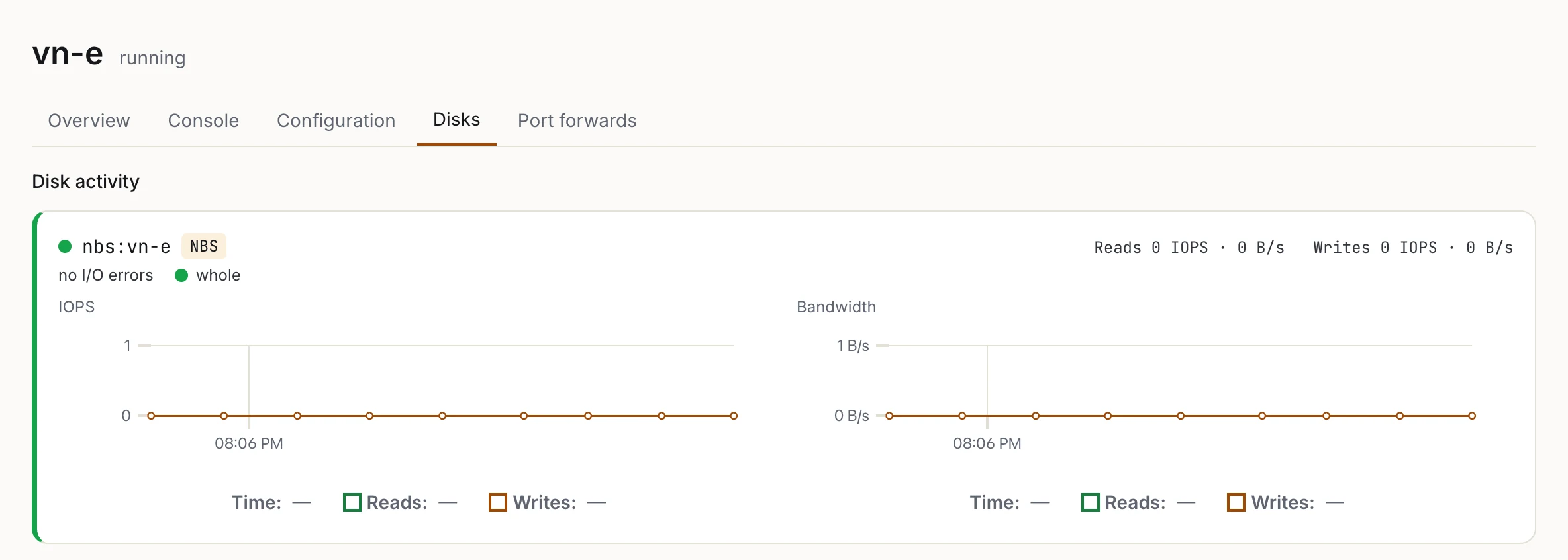
vn-e's Disks tab: its disk is the NBS volume vn-e, whole and with no I/O errors. The VM was idle, so the charts are flat.
Using it from the shell
The same, by hand. On each host, once the cluster's registry is up (the cluster describes that part):
$ insmod /lib/modules/nbs-mds.ko
$ insmod /lib/modules/nbs-cs.ko
On the first host, make the NBS cluster and add the others:
a$ nbs init store
nbs: NBS cluster store made (53f0...), a its first member (1730...) -- `nbs host add` the next
a$ nbs host add b
nbs: b is member 9512... -- a learner until it holds the log, then a voter while fewer than five vote
Each host gives NBS a device, named by its id:
a$ nbs devices add part:4f7661ab-0525-4f56-9d6b-9283d322e47c
nbs: device part:4f7661ab-... of this host's chunk server, 292 MiB -- device 3 in the metadata; its cs takes it in
Then volumes:
a$ nbs volume create disk1 64
nbs: volume disk1 (1), 64 MiB
a$ nbs volume disk1
nbs: volume disk1 (1), 64 MiB, 16 chunks of 4 MiB, its own host a, detached
  replicas, chunks a host: a 16, b 16, c 16
Images and VMs go through hv:
$ hv image img /boot.raw
hv: /boot.raw: raw, a disk of 32 MiB -- onto nbs:img, 32 MiB, fresh: its zeros left out
hv: nbs:img: 32 MiB written in 0.3 s, flushed and let go of
hv: nbs:img is an image now, 32 MiB, read-only for good -- hv create <vm> image=nbs:img makes a vm of a clone of it
$ hv create v1 image=nbs:img size=64M mem=256
hv: nbs:v1 cloned from nbs:img, 64 MiB -- thin: its chunks copied as they are written
hv image also takes a URL in place of a file. nbs status shows this host's member, the leader, and how many chunks are at three, two and one replica. nbs io reads and writes a volume straight from the shell, and nbsload puts a load on one.
What it doesn't do yet
A volume has one writer, so there are no shared disks. Writes are bound by the network, which on 1 Gbit/s means about 90 MiB/s. Copy-on-write works in whole 4 MiB chunks. There's no erasure coding, compression, deduplication or encryption at rest (the links between hosts are encrypted). A guest can't discard blocks yet. Only the hypervisor reads volumes, so nos itself can't mount one. And with three hosts the cluster survives losing one, but needs a fourth to rebuild the third copy.
Live migration of VMs between hosts is planned, and NBS is what makes it simpler than it would be: the disk doesn't have to move at all.
The details are in the NBS documentation and in the design notes, plans/nbs.md.