A management panel that is a VM of the host it manages
nos has a web panel now, and none of it is in the kernel. The kernel serves a host API over mutual TLS; the panel is a Next.js application in a Debian VM the host makes for itself. How the two fit together, and the two problems the first run on a real server turned up.
A machine that runs other people's VMs needs a screen to run them from: what the host is doing, which VMs it has, a button to make one from a cloud image, a console to type at. Since 28 October nos has one, and on the Hetzner EX44 it looks like this:
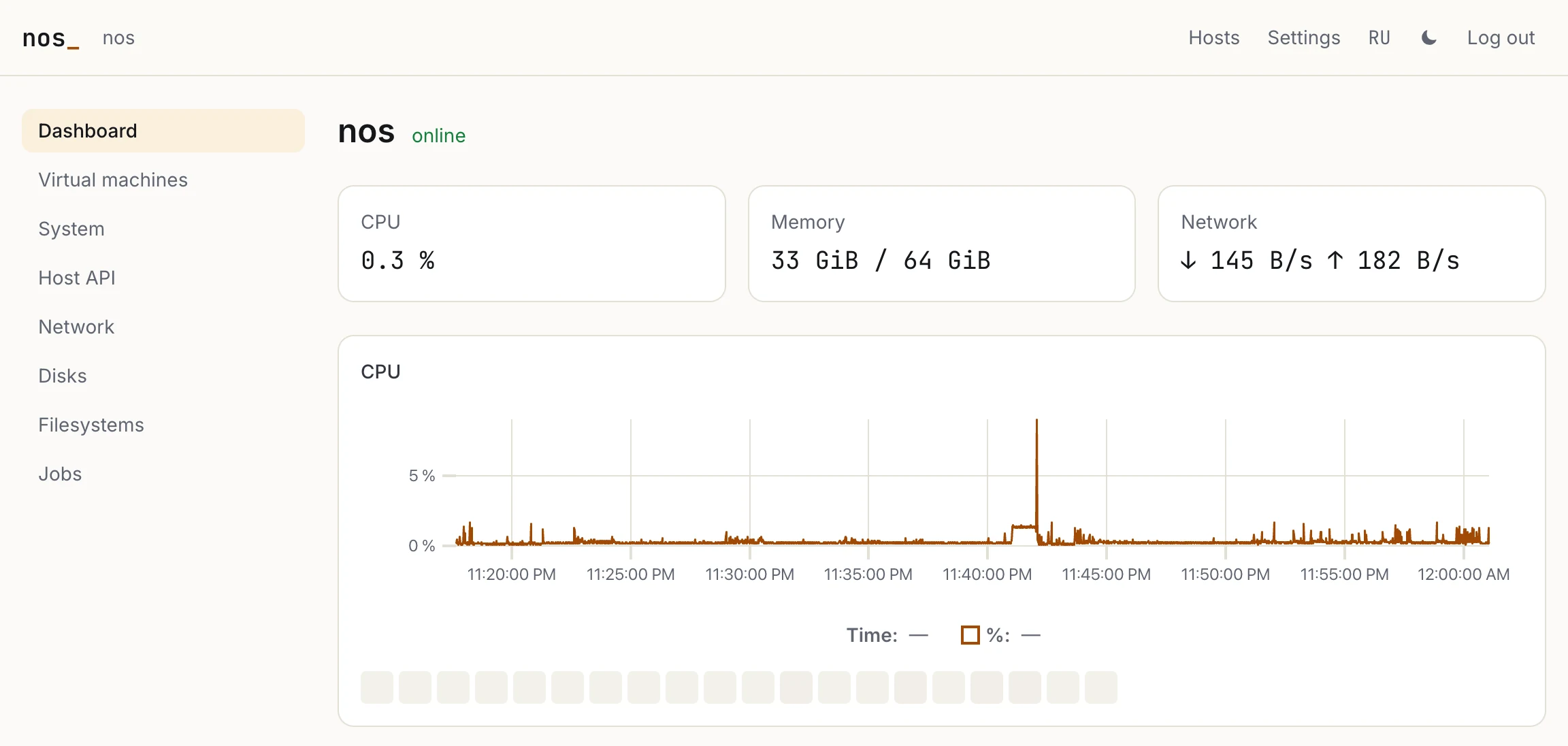
The EX44's dashboard. The 33 GiB of memory in use are mostly the 32 GiB pool of huge pages its guests' memory comes from; the squares under the chart are its 20 CPUs.
The first idea was a module that would serve the HTML and the JavaScript itself. We built something else, split the way VMware splits ESXi and vCenter:
- The kernel serves an API and nothing else. It is structured, versioned and reached only over mutual TLS. Every action the panel offers is a call of it.
- The panel is an ordinary client of that API, a Linux appliance in a VM. By default the VM runs on the host it manages, but nothing ties it there.
- The same API serves everything else that manages nos: the
nosctlcommand line, scripts, and the panels of other hosts.
There are two reasons. The first is what reaches the kernel's parsers. A client without a key the host knows is cut off in the TLS handshake, before a byte of HTTP, JSON or WebSocket is read. Everything a browser brings with it — passwords, cookies, sessions, cross-site requests, a content security policy — lives in the VM, where a mistake costs a VM and not the host. The second is the panel itself: charts, a terminal and forms are what a web stack is good at, and a kernel is not.
These commits, merged as 650e0b8, did it:
| Commit | What it added |
|---|---|
| 9f0e837, 75e3e95 | The management bus, and the image's own providers on it: system, net, block, fs |
| 4f739d5, 2add377 | HTTP/1.1, WebSocket and the bus's JSON in crates with no kernel in them, and a TLS 1.3 server that lets clients in by their keys |
| 0ea2131, 87accaa | The host API as a module, api.ko, and a fuzzer target that drives the module's own source |
| 4f6b4e0 | The vm provider: VMs created, cloned, deleted and changed through the bus, the long operations as jobs |
| 5b49598, 817196c | The panel, and the appliance: api panel create makes the panel's VM |
| d999ebb | More hosts in one panel, and a delete that asks for the VM's name |
| ec3745c, 283f1e1 | What the first run on the EX44 needed: TCP that does not hold a forwarded port to 8 KiB a round trip, and a panel that keeps within what the API lets in at once |
The bus: methods that describe themselves
Before this work nos had no structured interface of any kind. Modules did not call one another, and everything was a shell command that printed text. The management bus is the structured layer under the API. A part of the kernel registers there as a provider — system, net, block, fs, vm, api — and answers methods by name. A method is one of three kinds:
- a read, which answers at once and changes nothing;
- an action, a short change;
- a job for anything that can take minutes, such as making a VM from a URL. A job runs on a task of its own, says how far it has got, and stops when it is cancelled.
Each provider also hands the bus a descriptor: its methods, their parameters and results, and their titles in English and Russian. This is vm.delete's:
"delete": {
  "kind": "job",
  "title": { "en": "Delete", "ru": "Удалить" },
  "confirm": {
    "en": "This VM and its disks are deleted, and cannot be brought back. Type its name to go on.",
    "ru": "Машина и её диски будут удалены без возможности вернуть. Введите её имя, чтобы продолжить."
  },
  "confirm_typed": "name",
  "params": {
    "name": { "type": "string", "required": true, "title": { "en": "Name", "ru": "Имя" } },
    "keep_disks": { "type": "bool", "title": { "en": "Keep its disks", "ru": "Оставить диски" } },
    "force": { "type": "bool", "title": { "en": "Even if protected", "ru": "Даже защищённую" } }
  }
}
The bus checks a descriptor against the methods its provider actually registers. One that names a method the provider does not have is refused at registration, and so is a confirm_typed that names no required string parameter. The panel draws its pages from these descriptors: a read becomes a table with a Refresh button, and an action or a job becomes a form with a field for each parameter. The System page below is the system provider's descriptor drawn this way. "Set the nice" on each row is the action system.set_nice, given the task's PID.
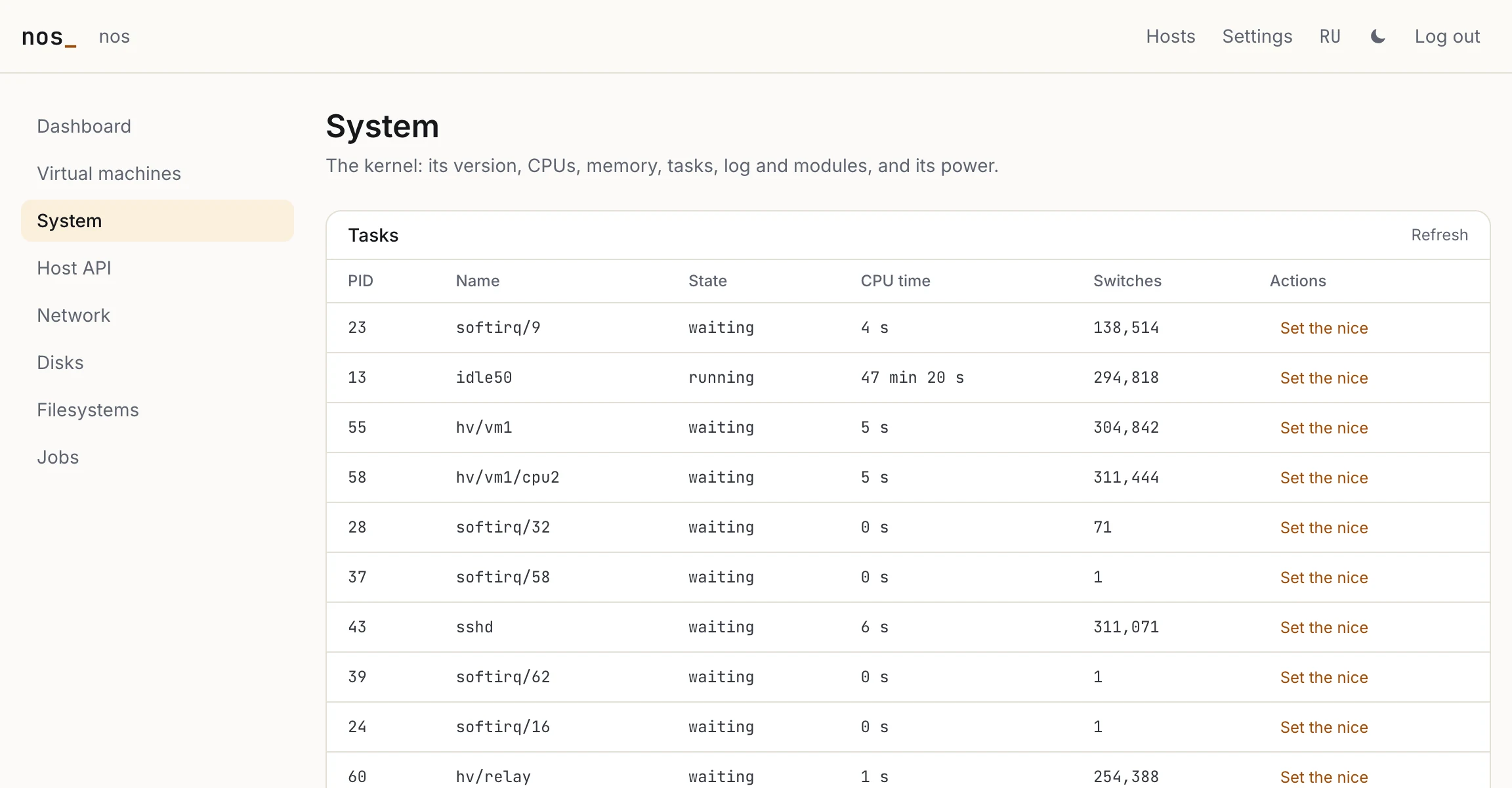
The kernel's tasks on the EX44, read through the bus. hv/vm1/cpu2 is a CPU of the user's Ubuntu VM, hv/relay the task that carries a forwarded port, hv/vm0/vda the panel VM's disk.
A new provider's methods appear in the panel without a line of the panel's code changing. The pages that are drawn by hand — the dashboard and the virtual machines — call the same methods.
The API: TLS before anything else
api.ko (docs) serves the bus over HTTP/1.1 and a WebSocket, inside TLS 1.3. The TLS server is the same no_std rustls the kernel's HTTPS client uses, now in its server role. A client must show a certificate, and it is let in by the SHA-256 of its key, looked up in /etc/api/clients the way authorized_keys works for ssh. No certificate authority is involved, in either direction. The client knows the host's key in advance and checks it before it sends anything. A client is an admin or a read: a reader is shown the reads alone and refused every change. The routes are GET /v1/providers, POST /v1/call/<provider>/<method>, POST /v1/jobs/<provider>/<method>, and the stream: GET /v1/stream, a WebSocket that carries the host's numbers, its log, the jobs and a VM's console as channels.
By default the API listens on hv0, the guests' switch, and nowhere else. api panel create narrows it further, to the panel VM's address. A connection from anywhere else on hv0 is reset before its handshake, and every change an admin makes goes into an audit log.
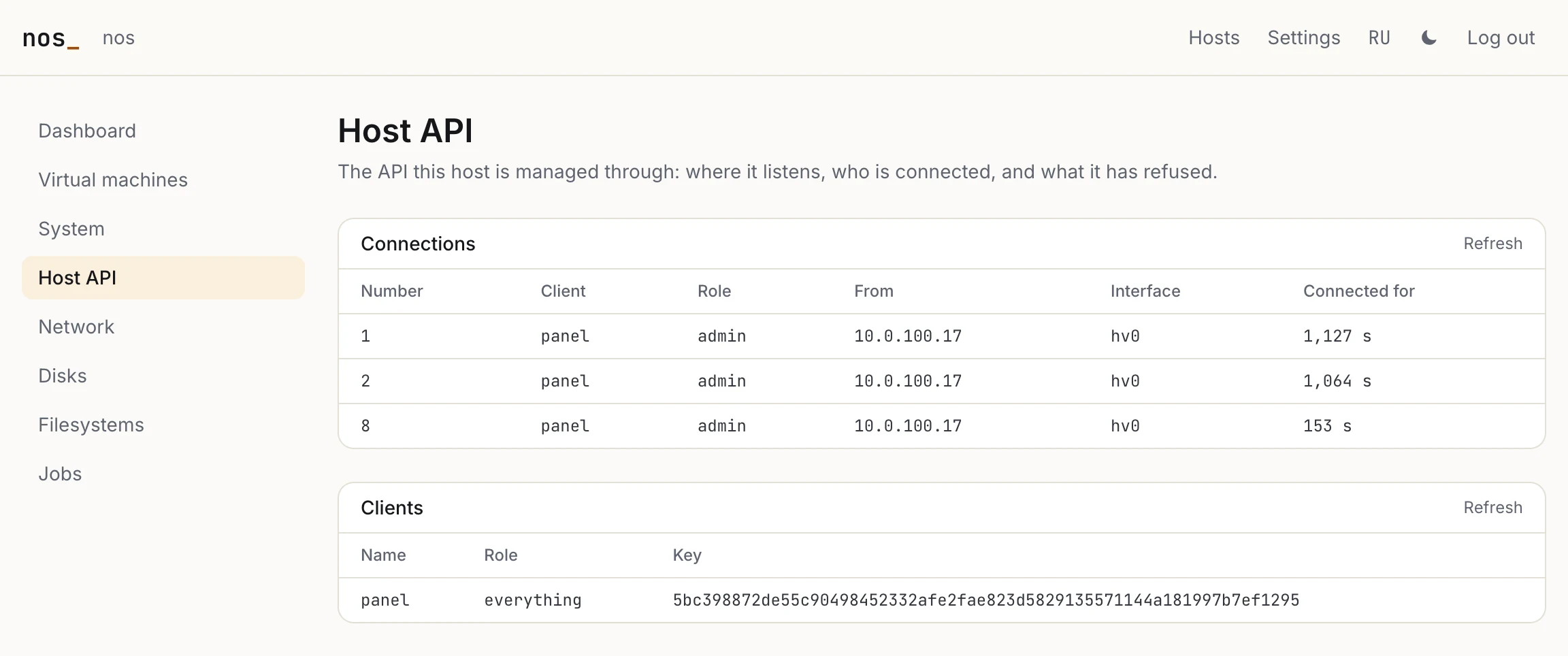
The API, through itself: three connections from the panel — two for requests, one for the stream — and the panel's key, the only client this host has.
The panel is an appliance
The panel is a Next.js application. It is built into a bundle together with Node 24 and Caddy 2.11, 79 MB in all, and runs in a Debian 13 VM. One command on the host makes everything:
$ api panel create
api: /etc/api/api.toml lets 10.0.100.17 in on hv0
api: the panel's VM is being made: job 5 -- mgmt job 5 follows it; port 15 of the switch, 10.0.100.17
api: https://203.0.113.5:39233 once it has installed itself, minutes after its image is in
api: its certificate, as a browser shows it: SHA-256 05:DB:D5:D2:BC:C8:90:61:1D:7B:AB:4F:1F:35:51:D7:A4:0A:28:29:1C:12:20:CF:54:28:CA:E3:02:4F:3F:F2
The command and the job it starts do the following:
- It makes the panel's identity as a client of the API: a P-256 key and a certificate, let in as
panel, an admin. - It makes the panel's certificate as an HTTPS server. The host makes this one so that it can print the fingerprint a browser will show.
- It writes cloud-init's seed. The seed carries the API's address on
hv0, the host's key to pin, both identities, the hash of root's password and a script. The script fetches the bundle, checks its SHA-256 and installs it. - It makes a VM of Debian's cloud image. On the EX44 that took 46 s: 325 MiB downloaded at 26 MiB/s, and the qcow2 converted to a raw disk in 32.6 s.
- It gives the VM the highest free port of the switch, forwards nos's port 39233 to the VM's 443, marks it protected and starts it.
nos-install --panel puts api panel create into /etc/rc, and makes root's password, which it prints once and keeps only as a hash. At every boot after the first, the line finds the VM already there and only starts it. api panel says where it is:
$ api panel
api: the panel's VM is running, port 15 of the switch, 10.0.100.17
api: https://203.0.113.5:39233
api: its certificate, as a browser shows it: SHA-256 05:DB:D5:D2:BC:C8:90:61:1D:7B:AB:4F:1F:35:51:D7:A4:0A:28:29:1C:12:20:CF:54:28:CA:E3:02:4F:3F:F2
The certificate is the host's own, so a browser warns about it once. The fingerprint api panel printed is what tells you the page is your panel and not someone in between. The VM is protected: the API refuses to stop or delete it unless it is asked with force. While it is down, the host can still be managed with ssh and nosctl.
Inside the VM, Caddy terminates HTTPS and offers HTTP/2, so a browser needs only one connection through the forwarded port. The panel's own server checks the root password, keeps a session in a __Host- cookie, and refuses a change that does not come from the panel's own pages. For each host it manages, it keeps a pool of TLS connections to the API and one stream. The numbers the stream sends, the panel keeps as history for the charts.
The virtual machines page and a VM's own page are drawn by hand, from the vm provider's reads:
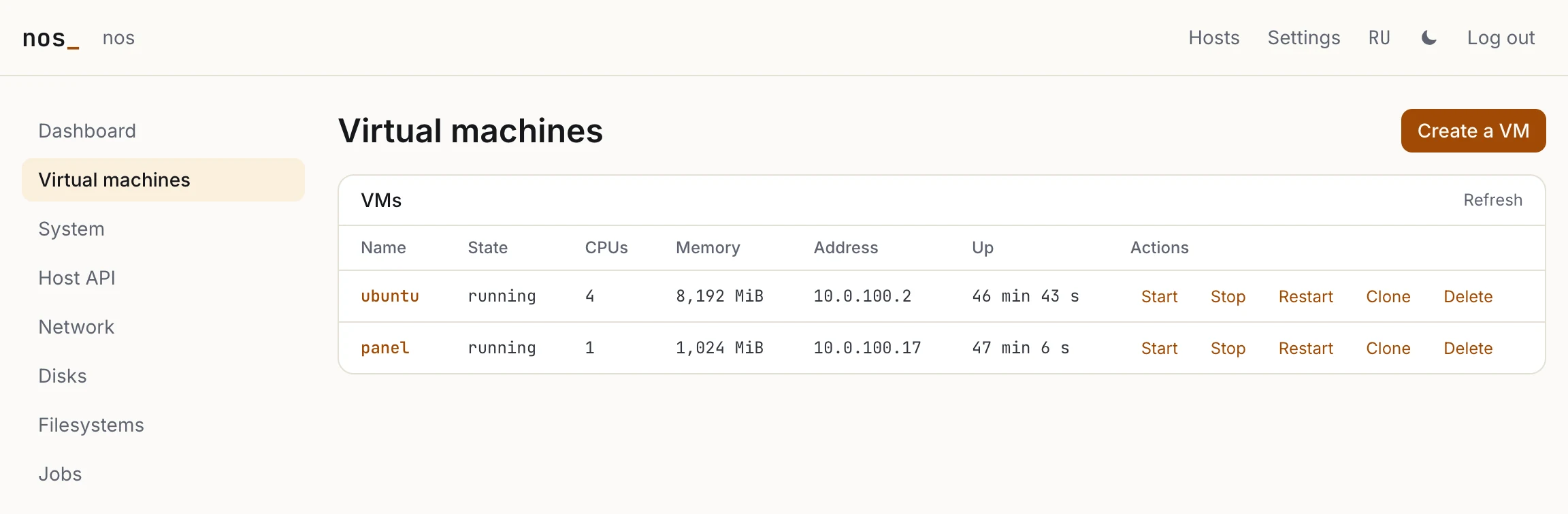
The EX44's two VMs: the user's Ubuntu, and the panel itself.
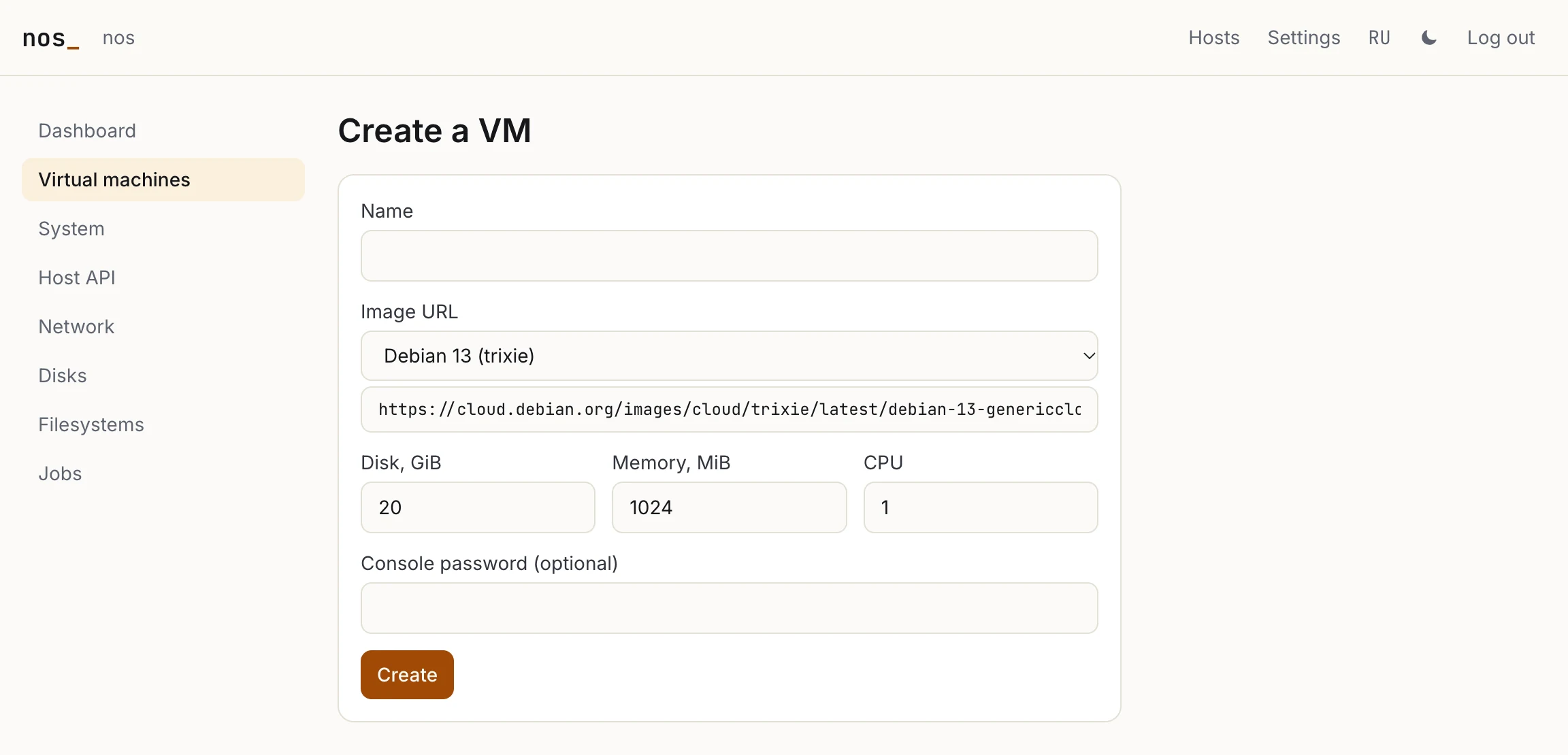
The "Create a VM" form is vm.create's descriptor, with a list of images: a name, a cloud image's URL, the disk's size, memory, CPUs, and a password for the console if one is wanted.
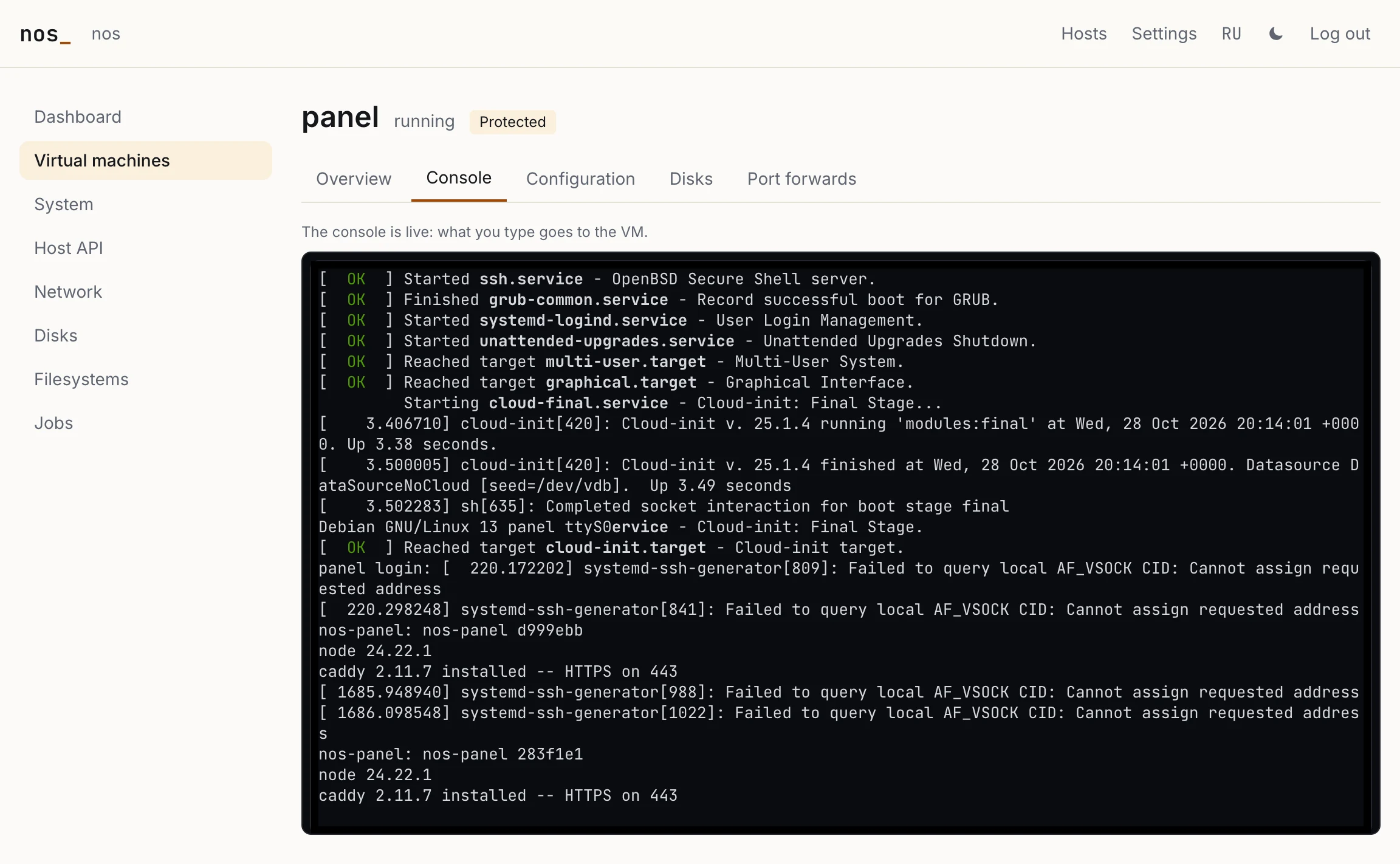
A VM's console is a channel of the stream, and what is typed into it goes to the VM. Here it is the panel VM's own console. Its last lines are the panel being installed into it, twice: the first bundle, then the one with the fix described further down.
A delete cannot be clicked through by accident. confirm_typed makes the form ask for the VM's name again, and Confirm stays off until the name matches.
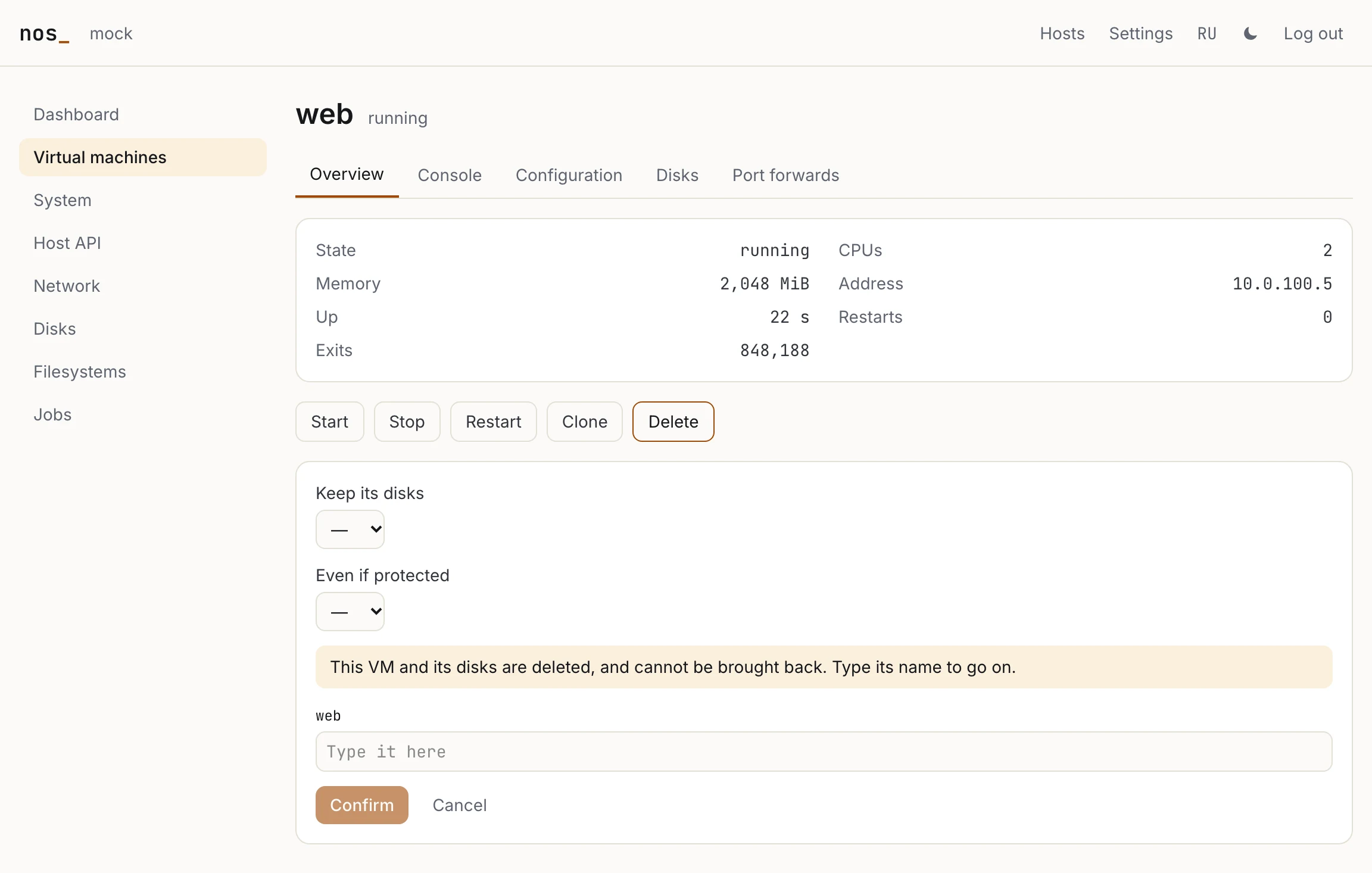
This one is from the panel's test setup, against its mock API: on the EX44 we did not press Delete on anyone's VM.
More than one host
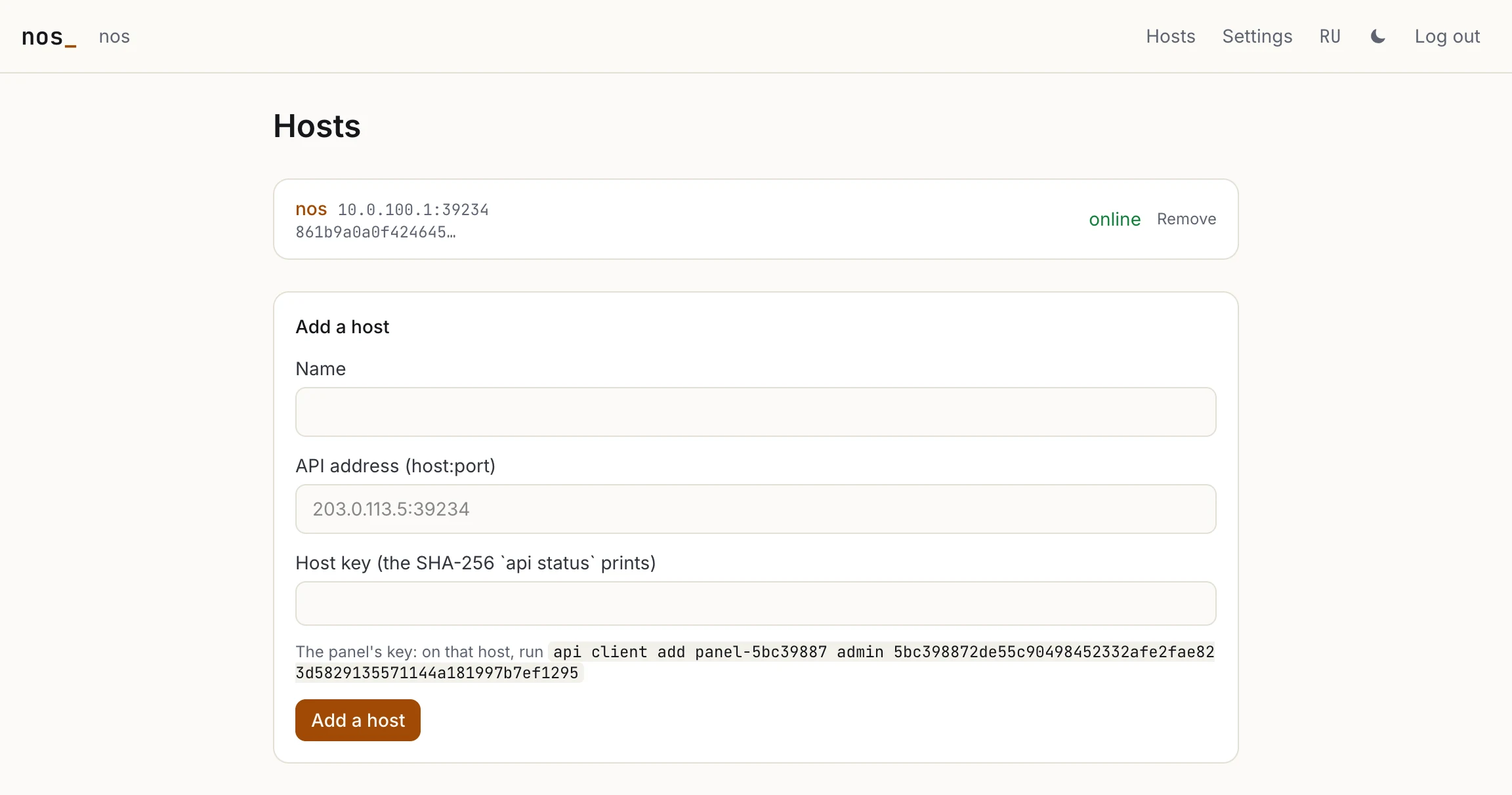
The panel's identity is a key, and a key can be let in anywhere. The Hosts page adds another nos by the address of its API and its key, the SHA-256 that the other host's api status prints. The page also shows the command that lets this panel in over there: api client add panel-5bc39887 admin 5bc39887…. The other host's API must listen where the panel can reach it, usually on eth0, with an allowlist. Each host gets its own pages, its own pool of connections and its own stream. If a host shows a key other than the one given, the panel does not reach it, and its card says which key it showed.
On the EX44: 8 KiB a round trip
The panel passed its tests: Playwright drove the production build against a mock of the API, and a Debian container ran the bundle as the VM runs it. Then it went onto the EX44, and the first thing to measure was the way in. A browser reaches the panel through hv forward, which accepts on nos's port 39233 and relays to the VM's 443. From a desk 62 ms away, it carried 120 KiB/s down and 69 KiB/s up.
The cause was TCP. nos gave a connection it accepted 8 KiB of buffer each way. A TCP sender sends a window per round trip, and 8 KiB per 62 ms is about 130 KiB/s on any line. Only the HTTP client's own connections had been given more. So the 83 MB bundle would have taken about 20 minutes to copy into the VM. We could have taken the relay out of the path with destination NAT. Instead we fixed TCP in ec3745c, so that it stops being the bottleneck for everything that uses it:
- A listener can now be a bulk one, and
hv forward's is. A connection it accepts is given 512 KiB buffers both ways. They come from the heap whenaccepthands the connection out, never under a lock. The connection scales its window from the SYN-ACK on, when the peer's SYN offers to. - Congestion control, which a window of hundreds of kilobytes needs. It follows RFC 5681: ten segments to start with, slow start and congestion avoidance. A lost segment is sent again on the third duplicate acknowledgement, and further losses in the same window go out one per partial acknowledgement (NewReno). A timeout takes the window back to one segment, and the acknowledgements that come back send the rest. Before, a timeout sent the whole outstanding window again at once.
- The relay waits a millisecond on an idle side while bytes are moving, rather than five. A download used to wait out the idle direction's read every round, 4 KiB at a time.
The net fuzzer's TCP target got a link that loses the machine's own segments, so that every recovery path has to fill its holes and keep every byte. Its ten-minute campaign then found a gap — in the model, not in the kernel. A peer that came back from silence still had retransmits to run out, and gave up after the model's resets had already been sent, so the machine was never told. After that fix, two more ten-minute campaigns found nothing. The same route from the same desk now carries 1,249 KiB/s down and 1,214 up: the bundle went in in 63 s. A browser that has never seen the panel, with a new TLS connection, loads the login page in a median of 839 ms over HTTP/2.
ECONNRESET on every page
The next thing to fail was the panel. Logged in, nearly every page said read ECONNRESET. api status on the host gave the reason in one line:
api: 37 connections taken, 0 not allowed, 39 past a limit, 0 refused in the handshake (0 unknown keys), 28 requests, 1 streamsapi.ko lets in eight connections at once, four for one key and two that are still in their TLS handshake. A handshake costs a signature and two checks of one, and every connection is a task of its own and a slot of the kernel's 64 for TCP. A connection past a limit is reset. The panel's server opened up to three connections to a host at once, plus the stream. A page asks several things at once, so a cold page made three handshakes at the same time, and the third was reset. Next.js may also load a module once for each of its bundles, which gave the panel a pool per bundle. And the mock the tests ran against had no limits at all.
283f1e1 fixed both the panel and its tests:
- The panel makes a host's connections one at a time: the pool's and the streams' alike.
- It keeps two for requests: two, the stream and a console's stream make the four a key has.
- There is one pool per process, kept on
globalThis. - A connection reset at the door is tried again, 100 ms later and twice that each time after: the host may have been at its limit because of another client.
- The mock now has api.ko's limits, resets past them the way nos does, and counts them the way
api statusdoes. The suite ends by checking that the count is 0 on both hosts, after every page and a dozen requests at once.
With the old client, that suite fails 7 tests of 12, and one of them shows exactly the EX44's page: "VMs … Refresh … read ECONNRESET". With the new client all 12 pass. On the EX44, with the API's default limits back in place, the next session in the panel made 121 requests over 4 connections, and none was past a limit.
What it does not do yet
- The API does not see a browser's address, only the relay's. The panel counts failed logins once for everyone; the relay could pass the address on with the PROXY protocol.
- The panel's data — its sessions and the hosts it knows — is on the VM's system disk. A separate data disk, which an update of the appliance would leave alone, is the next step.
- The panel's certificate is made once and never renewed.
- The relay still bounds a forwarded port: a round moves 4 KiB, and nos's own connection to the guest holds 8 KiB. That is about 1.2 MiB/s at 62 ms, plenty for a panel and short of the line.
- Linux guests, and so the panel's VM, run only on x86-64 hosts. An arm64 nos is managed by an external panel or by
nosctl.
Stage 4 of the roadmap is a control plane for many hosts. The API and the panel are its first half: one host, or a few added by hand, each managed through the same calls. The API is described in The host API, and the bus under it in The management bus.